Coming soon — StreamUps Sentinel

Know When Your Stream Is In Trouble

Sentinel is a free stream health monitor that runs alongside OBS and continuously watches your stream, system and connection — so you can spot problems before your viewers do.
See how it works
  • Runs alongside OBS
  • Real-time monitoring
  • Built for streamers
  • Free at launch
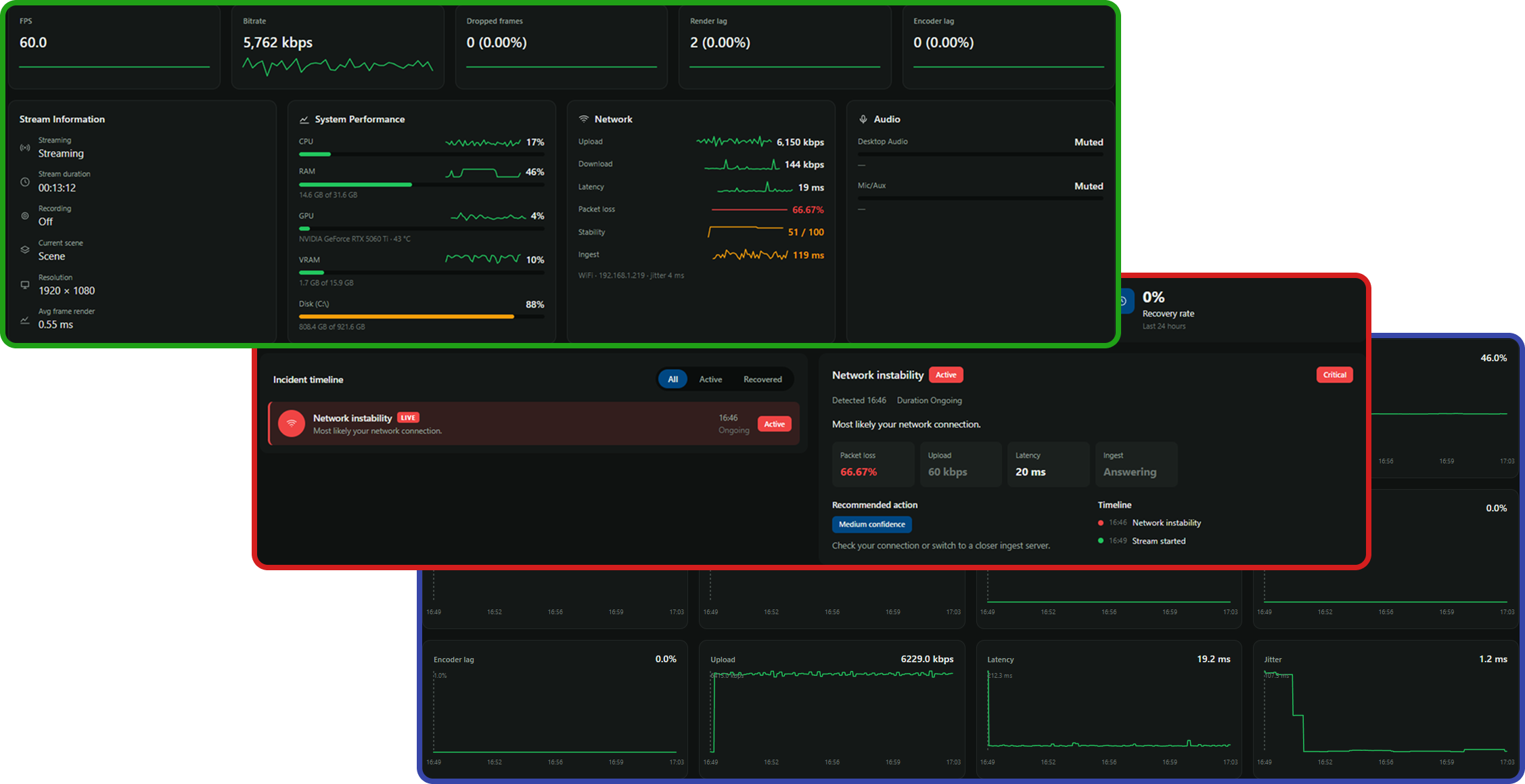
The Sentinel monitoring dashboard, incident detail and session history charts layered together

You're Focused On The Game

Your viewers are watching the stream. Meanwhile, something else could be going wrong.

  • Your encoder is struggling.
  • Your GPU is overloaded.
  • Your network is dropping packets.
  • OBS is losing frames.
  • Your bitrate is collapsing.
  • Your microphone has disappeared.
  • Your stream is technically live, but viewers are getting a poor experience.

OBS gives you a lot of information. Sentinel turns that information into something you can actually understand.

Meet Your Stream's Technical Guardian

Sentinel sits quietly alongside OBS while you stream, watching the important stuff in the background.

No digging through OBS statistics. No guessing whether that stutter was your game, your encoder or your connection.
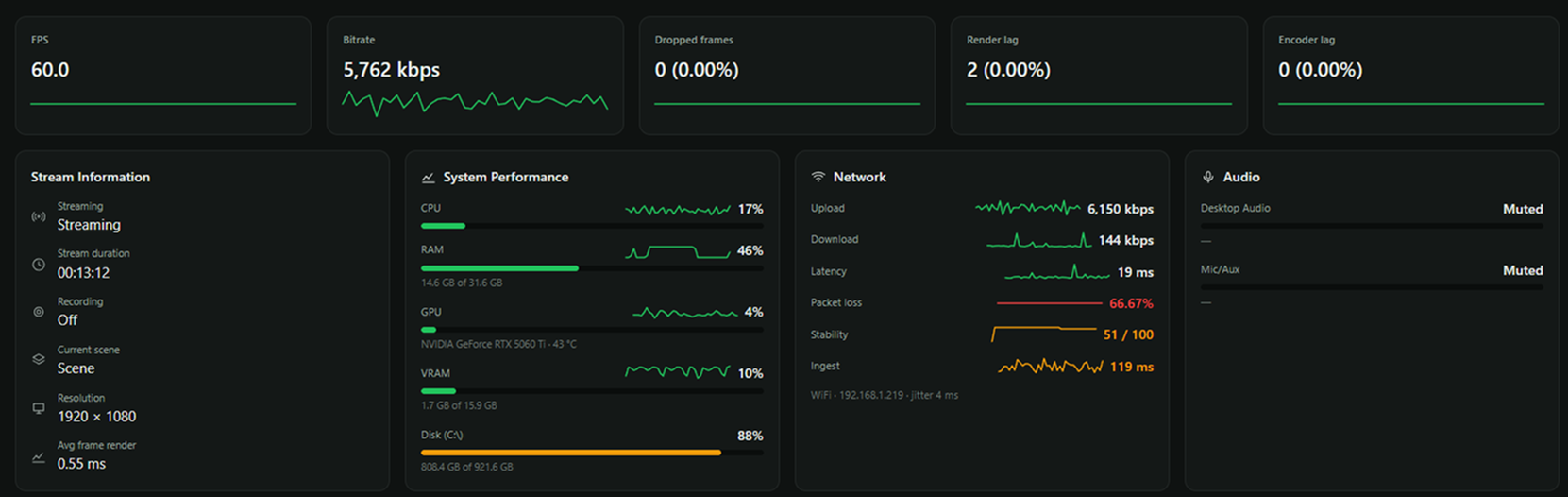
Sentinel dashboard showing FPS, bitrate, dropped frames, render lag and encoder lag alongside stream information, system performance, network and audio panels
FPS, bitrate, dropped frames, CPU, GPU, upload, latency and packet loss on a single screen.
OBS

Monitor your broadcast in real time

  • Streaming status
  • FPS
  • Bitrate
  • Dropped frames
  • Render lag
  • Encoder lag
  • Current scene
System

Know when your PC is becoming the problem

  • CPU usage
  • GPU usage
  • Memory
  • GPU memory
  • System performance
Network

Know whether your connection is holding up

  • Upload performance
  • Latency
  • Packet loss
  • Connection stability
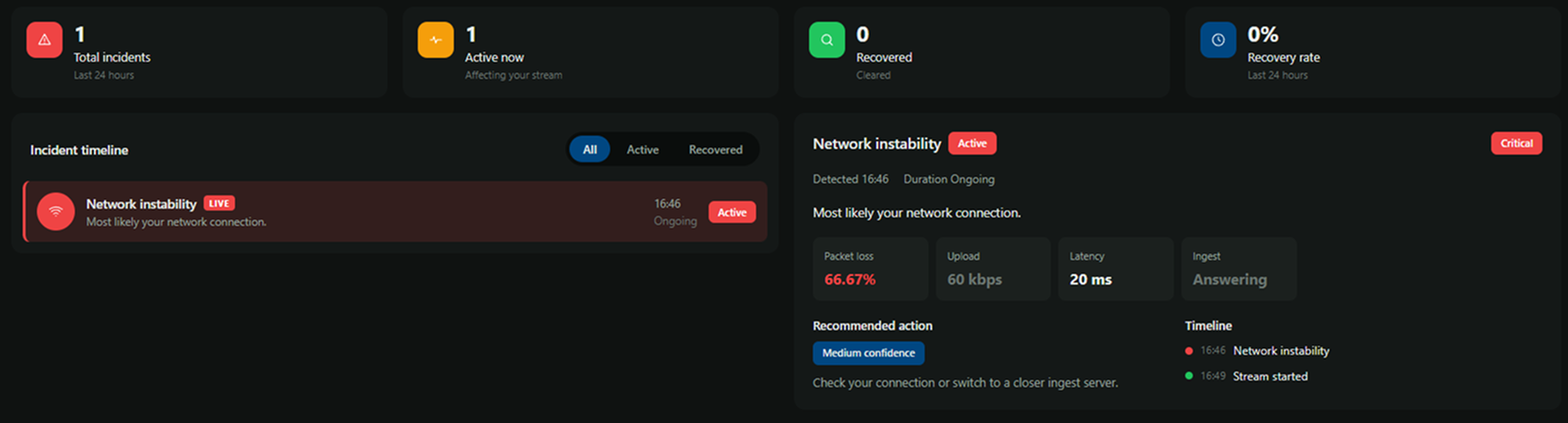
Sentinel incidents view showing an active network instability incident with packet loss, upload, latency and ingest readings plus a recommended action

Don't Just Show Me Numbers. Tell Me When They Matter.

Sentinel isn't designed to make you stare at graphs while you're streaming.

It watches the numbers for you. When something starts going wrong, Sentinel makes it obvious — what broke, when it started and what to try next.

  • Smart incident detection
  • Clear explanations of what went wrong
  • Actionable recommendations
  • Incident timeline so you can review what happened

Built To Work Alongside OBS

Sentinel connects directly to OBS and reads your live broadcast statistics. There's no need to replace OBS. There's no need to change the way you stream. Just launch Sentinel alongside your existing setup.

  1. 1

    Install Sentinel

    Download the free desktop app when it launches.

  2. 2

    Open OBS

    Sentinel detects your OBS connection.

  3. 3

    Start streaming

    Sentinel starts monitoring your broadcast.

  4. 4

    Keep streaming

    Sentinel keeps watch in the background.

These steps describe how Sentinel will work at launch.

Sentinel Shouldn't Become Another Problem

Your PC already has enough to do.

You're running a game, OBS, Discord, browser tabs, plugins, music and probably 47 things you forgot were open.

Sentinel is designed to stay lightweight so it can monitor your stream without getting in its way.

  • Lightweight desktop application
  • Runs alongside OBS
  • Background monitoring
  • Minimal resource usage
  • System tray support
  • Designed for long streaming sessions

Your Entire Streaming Setup. At A Glance.

OBS

Broadcast health

  • Streaming status
  • FPS
  • Bitrate
  • Dropped frames
  • Render lag
  • Encoder lag
  • Current scene
PC

System health

  • CPU
  • GPU
  • RAM
  • VRAM
  • System load
Network

Connection health

  • Upload
  • Latency
  • Packet loss
  • Connection stability
Devices

Setup health

  • Audio devices
  • Camera availability
  • Capture devices

Sentinel Works While You Do

What Sentinel is doing at each stage of your broadcast
WhenWhat Sentinel does
Before you streamCheck that your setup is healthy.
While you streamMonitor OBS, your PC and your connection.
When something goes wrongSee the problem instead of hunting through settings.
Throughout your streamContinuously monitor your setup from start to finish.

Drill Into Any Part Of Your Stream

Sentinel splits your monitoring into segments. A segment starts when you go live and ends when you stop, so every broadcast becomes its own record you can open up afterwards.

You can also mark a custom segment at any point — around a raid, a scene change, a guest joining or the moment a stutter appeared — and analyse just that window.

That means you're not scrolling through hours of graphs to find the two minutes that went wrong. Pick the segment and drill straight into it.
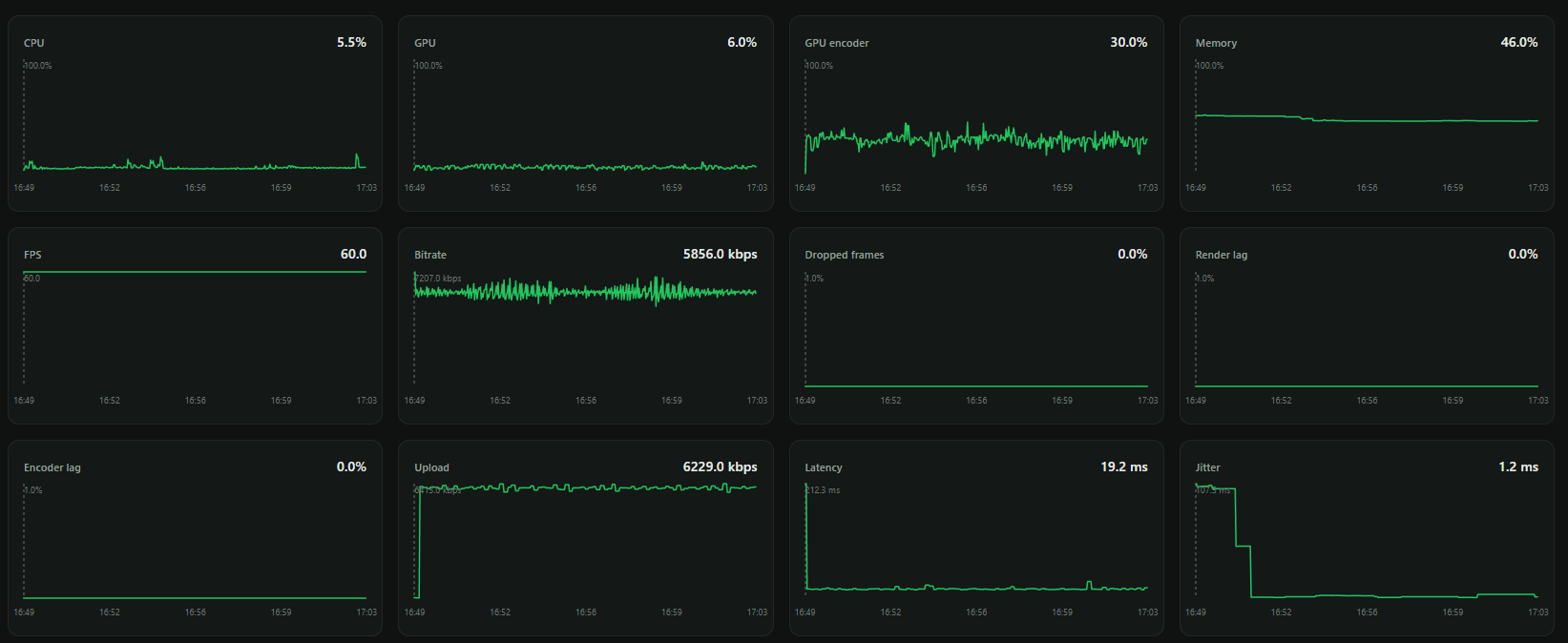
Sentinel session history charts tracking CPU, GPU, GPU encoder, memory, FPS, bitrate, dropped frames, render lag, encoder lag, upload, latency and jitter across a stream
Every metric is recorded across the session, so you can look back at the moment things changed.

Your Stream Data Starts On Your PC

Sentinel's core monitoring happens locally on your machine.

You don't need a cloud service just to know whether OBS is healthy.

Your monitoring engine runs alongside your setup and can continue working without relying on a remote dashboard.

Cloud features and synchronisation may come later. The core Sentinel experience starts locally.

Built For People Who Care About Their Stream Working

Casual streamers

You don't need to understand every OBS statistic. Sentinel gives you the important stuff.

Regular creators

Know when recurring problems are affecting your streams.

Technical streamers

Get the underlying metrics you need without digging through multiple windows.

Anyone who's ever asked...

"Is my stream actually working?"

Sentinel is for you.

Everything You Need To Start Monitoring Your Stream

  • OBS monitoring
  • Stream status
  • FPS monitoring
  • Bitrate monitoring
  • Dropped frame monitoring
  • Render and encoder monitoring
  • CPU monitoring
  • GPU monitoring
  • RAM monitoring
  • Network monitoring
  • Connection status
  • Background monitoring
  • System tray
  • Free desktop app

Sentinel FAQ

When is Sentinel available?
Sentinel is still in development and isn't available to download yet. Join the waitlist above and we'll email you as soon as the Phase 1 desktop monitor is ready.
Is Sentinel free?
Yes. The Phase 1 Sentinel desktop monitor will be free to use.
Does Sentinel replace OBS?
No. Sentinel works alongside OBS and monitors what's happening inside your streaming setup.
Do I need an account?
For the initial local monitoring experience, no account is required.
Does Sentinel work without OBS?
Sentinel's core stream monitoring is built around OBS, although system and network monitoring can operate independently.
Does Sentinel monitor my game?
Sentinel doesn't need to capture or record your gameplay. It monitors the technical health of your streaming setup.
Will Sentinel affect my FPS?
Sentinel is designed to be lightweight and run alongside your game and OBS with minimal resource usage.
Does Sentinel upload my stream?
No. Sentinel does not need to upload your actual video stream. It monitors technical metrics locally.
What platforms does it support?
For Phase 1, Sentinel is built around OBS rather than any specific streaming platform. This means Sentinel focuses on the health of your streaming setup rather than tying the product to a single platform.

Related Guides & Tools

Be Ready Before Your Viewers Notice

Join the waitlist and we'll email you when Sentinel is ready to show you what's really happening inside your stream.

Windows · Free at launch · Built by StreamUps