Rumble Stream Keys Work Differently — Here's What Nobody Tells You
Your Rumble title lives on a template attached to your stream key, not on the broadcast. Here's why, what it costs you, and how to turn it into an advantage instead of a recurring annoyance.
You changed your stream title, went live, and Rumble is showing last week's. Twitch updated. Kick updated. Rumble is sitting there with the wrong name on it, and nothing anywhere reported an error.
Nothing is broken. Not your multistream tool, not your account, not Rumble. What you have run into is a genuine design difference in how Rumble stores stream metadata, and it is one that almost nobody writes about — which is why the first time you meet it, it feels like a bug.
It takes about two minutes to understand, and once you do you will never hit it again. Better than that, the same mechanism that just caught you out turns out to be quite useful once you set it up deliberately.
The Symptom
If this is what you are seeing, you are in the right place:
- The title on Rumble does not match the title you set before going live.
- Nothing reported an error — no warning, no failed push, no red text anywhere.
- Your other platforms updated correctly, so the tool clearly works.
- Applying the settings again does not fix it.
- It is the same wrong title every single time.
That last one is the diagnostic clue. It is not showing a random old title, and it is not showing nothing — it is showing one specific title, the same one every time. That title is coming from somewhere, and once you know where, the whole thing makes sense.
How Rumble Actually Stores Your Metadata
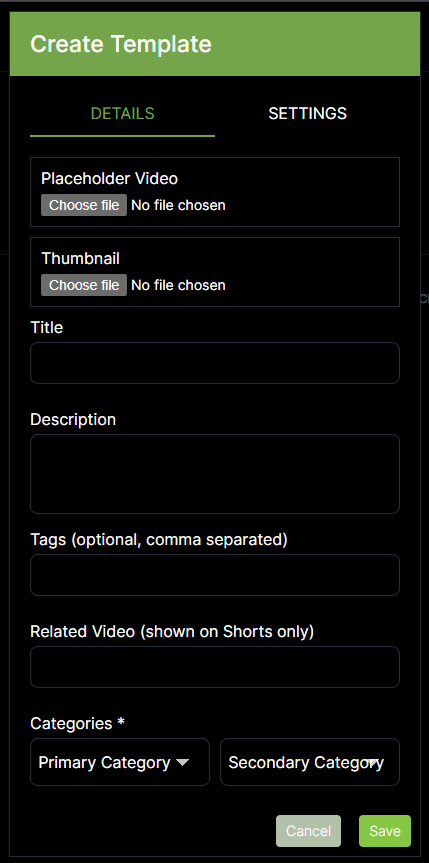
On Rumble, your stream title, description, tags and category live on a template attached to your stream key, not on the broadcast itself. Changing the title in a multistream tool swaps which key it sends to — it does not rewrite that key's template, which must be edited on Rumble.
There are three layers, and they stack like this:
- 1
The template
A saved bundle on Rumble holding a placeholder video, a thumbnail, a title, a description, tags and a category. You can have as many as you want.
- 2
The static stream key
A key that does not rotate between broadcasts, with a template assigned to it from a dropdown. The assignment is a separate step from creating the key, and it is the one people skip.
- 3
The broadcast
Sends to a key. The key's template supplies the metadata. The broadcast itself carries no title of its own for anything to change.
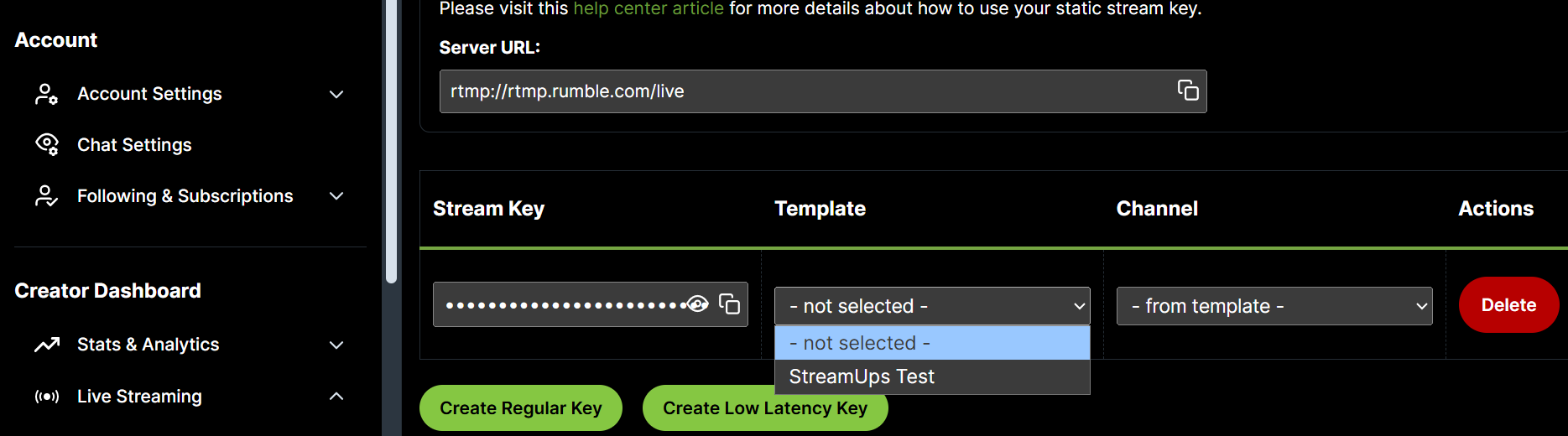
Which gives you the sentence that makes the whole thing click: on Rumble, metadata is a property of the key, not of the broadcast.
Compare that to Twitch, which is the model every tool's documentation is implicitly written around. On Twitch your stream key is only an address — it says where the video goes and nothing else. Your title and category are set separately, over the API, and they can be changed while you are live. When a tool changes your Twitch title, it is asking Twitch to change it. There is no equivalent request to make on Rumble, because there is nothing live to change.
And here is that same template text, on the live channel page, exactly as a viewer sees it:


Why Rumble Does It This Way
It is easy to read this as Rumble being behind, and that is not quite fair. The model follows from what Rumble is.
Rumble is a video platform with a live streaming feature, not a live-first platform with video attached. Templates come from a publishing mindset, where metadata belongs to an asset and is decided before the asset exists. Seen from there, attaching a title to a stream key is not strange at all — it is the same thing as attaching a title to an upload.
There is also a practical argument for it. A template carries a placeholder video and a thumbnail, and those only make sense if the metadata exists before the broadcast does. It means your channel page is populated before you go live rather than appearing blank and filling in afterwards, which is a genuinely better experience for anyone who arrives early.
That said — it is still worse for anyone who changes what they stream often, and pretending otherwise would be silly. If your title is different every session, this model works against you and you will feel it.
What It Costs You
Four real costs, in rough order of how often they bite:
Spontaneous title changes mean leaving your tooling
Decided at the last minute to play something else? On Twitch and Kick you change the title where you already are. On Rumble you go to Rumble, find the template, edit it, and come back.
Mid-stream title changes are effectively impossible
The metadata is fixed to the key you are already broadcasting to. There is no live edit to make. Whatever the template said when you went live is what Rumble shows until you stop.
Miss the assignment step and the key carries nothing
Creating a template and creating a key are two separate actions, and linking them is a third. Skip it and your broadcast goes out without the title, description, tags and category you thought you had set — silently.
One key for everything flattens your channel
If a single key serves every stream, every Rumble stream you run carries an identical title and category. That is a real discovery cost, and it is invisible because nothing about it looks wrong.
The last one is the trap almost everyone falls into. Running a single key feels simpler — one thing to set up, one thing to remember — right up until you notice every Rumble stream you have ever done carries the same title, and your channel looks like one long undifferentiated block to anyone browsing it.
How to Work With It Instead of Against It
The fix is not a workaround. It is building the thing the model is actually good at: one template-and-key pair per stream type, and then choosing between them.
You are not limited to one template or one key, and this is where the whole design stops being an obstacle. Work out how your streams genuinely vary, and build a pair for each axis that matters:
| If your streams vary by... | Build a pair for... | Because |
|---|---|---|
| Game | Each game you stream regularly | Category is the strongest discovery signal Rumble has to work with |
| Format | Just Chatting, gameplay, collabs | Description and tags differ between these far more than the title does |
| Schedule | Recurring named segments | The title is already stable, so a template fits it perfectly |
| Almost nothing | One default pair | Do not build machinery you will never switch between |
Build a pair for the way your streams actually differ. Building more than you will use is its own kind of maintenance.
Then there is one writing habit that makes the difference between this working and this being a chore:
Write Rumble titles to be durable, not specific
"Ranked Grind — Road to Diamond" survives twenty streams. "Ranked Grind Ep. 47" survives one, and then it is wrong every time until you go and fix it. Put the volatile detail — the episode number, tonight's guest, how close you are to the rank — on the platforms that accept live metadata, and let Rumble carry the version that stays true.
Do that and the caveat at the top of this post stops existing for you. Not because it went away, but because you stopped needing to fight it.
Practically: revisit your templates monthly rather than per stream, and treat a new template as something you make when you genuinely add a new kind of stream, not when tonight is slightly different from last night.
The build steps are in how to multistream on Rumble, Kick and Twitch, and once your keys exist they become selectable from a Stream Info preset, so switching stream type switches Rumble along with everything else.
What Would Have to Change
For any multistream tool to set your Rumble title live, Rumble would have to expose a way for third-party tools to update a broadcast's metadata after it has started. It does not do that today.
Which means no tool can work around this — StreamUps included. We can select which of your Rumble keys to broadcast to, and that is genuinely useful, but we cannot rewrite the template that key points at. If a product tells you it sets Rumble titles live, it is worth asking exactly what it does, because the platform does not currently offer the door it would need to walk through.
If Rumble opens that up, this behaviour changes and this post gets updated. Until then, the durable-titles habit above is the whole answer.
Rumble Stream Key FAQ
Why is my Rumble stream title different from the one I set?
Can any tool change my Rumble title automatically?
What happens if I don't assign a template to my stream key?
Can I change the template while I'm live?
How many templates should I actually make?
Does the placeholder video matter?
Is this a StreamUps limitation?
Do static stream keys expire?
Related Guides & Tools
Ready to Multi-Stream?
Start broadcasting to multiple platforms today. Free tier available with no credit card required.